
Enhancing Literacy Skills with Google Docs: A Step-by-Step Guide
JT
Introduction to Google Docs for Literacy
Enhancing literacy skills is more important than ever in today's digital age. Google Docs offers a versatile platform that can support students and educators in developing these crucial skills. By utilizing various features in Google Docs, learners can improve their reading, writing, and collaboration abilities.

Getting Started with Google Docs
To begin, you'll need a Google account to access Google Docs. Once logged in, navigate to Google Drive and select the "New" button to create a new document. This user-friendly interface is ideal for both beginners and advanced users.
Tip: Familiarize yourself with the basic tools such as:
- Text formatting
- Spell check
- Commenting feature
These are fundamental in promoting literacy skills.
Utilizing Templates
Google Docs provides a variety of templates that can serve as a starting point for different writing tasks. Whether you're drafting an essay or a newsletter, templates can help structure your work and enhance comprehension.

Collaboration and Feedback
One of the standout features of Google Docs is its collaborative functionality. Students can work together in real-time, allowing for immediate feedback and peer review. This interaction not only improves writing skills but also encourages critical thinking and problem-solving.
Commenting: Encourage students to use the commenting feature to provide constructive feedback to each other. This process fosters a supportive learning environment and develops communication skills.
Tracking Changes
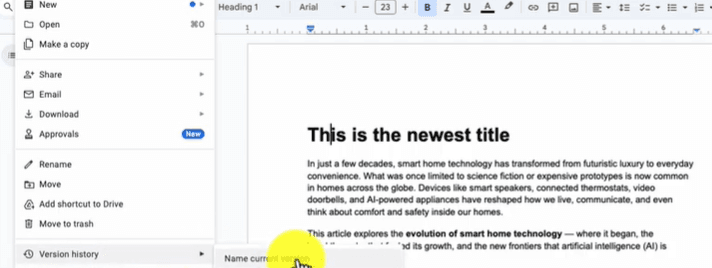
The "Version History" feature enables users to see edits and track progress over time. This tool is invaluable for teachers to monitor student development and for students to reflect on their growth.
Enhancing Vocabulary and Grammar
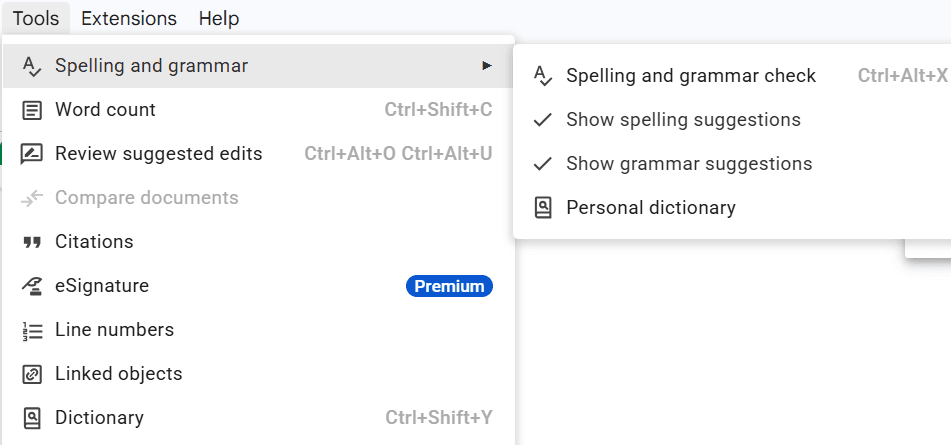
Google Docs offers tools such as spell check and grammar suggestions, which are essential for enhancing vocabulary and grammar skills. Encourage students to use these tools to identify and learn from their mistakes.
Additionally, integrating add-ons like a thesaurus or dictionary can provide students with more resources to expand their vocabulary.
Interactive Learning
Incorporate interactive activities such as quizzes or collaborative storytelling within Google Docs to make learning more engaging. These activities can be a fun way to practice literacy skills in a dynamic setting.

Conclusion: Maximizing Potential
By leveraging the features of Google Docs, educators and students can significantly enhance literacy skills. This powerful tool not only aids in writing and reading but also promotes collaboration and critical thinking. Begin incorporating Google Docs into your literacy activities today and witness the transformative impact it can have on learning.